








Home > Virtual Tour Terms

PANOSPHERIC™ 360° VIRTUAL REALITY TOURS - "YOUR IMAGINATION BECOMES A VIRTUAL REALITY"™.


V.T. Terms Page Index


DEFINITIONS…
 What
in an Immersive
What
in an Immersive
Panoramic Image?What
is QTVR?What
is Java?What
is a Virtual Tour/
(Hotspots)?What
is Image Stitching?
Panorama
Projection Types

We understand that many of the terms we use are unfamiliar to many of our clients, so we have provided some definitions. Hopefully they will assist you in deciding what you need, and understanding a little bit about the process of creating a Virtual Tour from beginning to end.
What is an
Immersive Panoramic Image?  Top
Top
Once you've created a 360° panoramic image by single-row, or multi-row stitching several photos together, in either cylindrical, spherical or cubic projection using a Stitching Software, you need to load your panoramic picture in a Viewer. Any of the free available Viewers like QTVR-Player(Quick Time Virtual Reality), Java-Viewer or Helmut Dersch's free PTViewer will warp your image using the proper projection type, either cylindrical, spherical, or cubic projection. The Viewer gives you a "window" onto the scene (image) and let's you pan sideways, or in any direction, depending on the projection type. It creates an immersive visual effect as if you were really there, rather than seeing a more surreal 360° degree panoramic photograph.
What is QTVR?
Top
Apple's Quick Time Virtual Reality (QTVR) is the most widely supported format for panoramic movies. There are two kind of formats, the QTVR 4 and the QTVR 5. The QTVR 4 is a cylindrical format and let's the user pan left and right only. The QTVR 5 format is a cubic format and let's you pan left, right, straight up, and down. To be able to view a QTVR movie you must have the Quick Time plug-in installed on your computer. You can easily download the latest QTVR plug-in at Apple's Website for free.
What
is Java? Top
What is a
Virtual Tour (Hotspots)? Top
Let's
take Real Estate as an example:
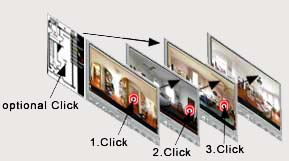
We create a panoramic image of every
room in a home. Then all the panoramic images are linked together
via hotspots (example: a door can be clicked on and lead you to
the next room, and so on). A visitor of your Virtual Tour can then
follow the guided tour via hotspots, or access a particular room via
a separate sidemap (floorplan).
What
is Image
Stitching? Top
single-row stitching versus multi-row stitching
"Stitching" refers to the technique of using a computer to merge images together to create a large single image. When an image stitching program assembles pictures, it will warp them by applying a form of projection.
- single-row stitching: 360° panoramas are merged with single-row stitching. You set up you camera and panoramic tripod head in a horizontal level position and pan in a single row, 360 degrees. With a software you need to merge all the single-row images together.
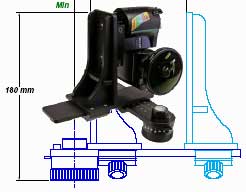
- multi-row stitching: spherical and cubic panoramas refer to multi-row stitching, unless you use a ultra-wide fisheye lens, that covers 180° HOV (Horizontal Field Of View), and it only takes 2-3 images to be merged to create a spherical panorama. With a wideangle lens you will need to use a spherical tripod head that lets you take several rows of pictures in a consistent angles. Spherical panoramas are easier to do with fisheye lenses but you will have to accept some distortion compaired to a distortionless, more complex, and time consuming multi-row stitching.
Panorama
Projection Types Top
Planar versus cylindrical, spherical, and cubic panoramas
- flat and planar panorama projection:
Conventional photographs are considered flat or planar, that means without any form of perspective correction. A planar projection in a Viewer lets you pan left and right without the immersive feeling. You are looking onto a flat picture that's moving left and right. Use with rectilinear lenses without distortion (straight lines). - cylindrical panorama projection:
The most common format for panoramas is the cylinder. A cylindrical panorama is intended to be viewed as if curved around the inside of a cylinder. You can pan left and right with an immersive feeling as if you were inside the cylinder. Use with rectilinar lenses without distortion (straight lines) in the image. - spherical (equirectangular) panorama projection:
A spherical panorama is intended to be viewed as if projected inside a sphere. You can pan left, right, straight up, and down with an immersive feeling as if you were inside a sphere. Use with ultra-wide 6-8mm fisheye lenses with a coverage of more than 180° or a 14-15mm wide angle lenses. When using fisheye lenses then it only takes two or three images to create a full spherical panorama (single-row stitching). When using a wide angle lense you will need a special spherical tripod head to take several rows of pictures and add up and down shots (multi-row stitching). - cubic panorama projection:
Apple's QuickTime 5 made this format popular.Cubic images contain 6 separate cube faces, which are in themselves planar images, without any perspective distortion. You can pan left, right, straight up, and down. Cubic is the most efficient format, because each of the cube faces looks "normal". These images can be easier to edit or modify with image editing software because of no distortion.
Home | Services | VT Domain Names | Pricing | VT Terms | Contact Us
Copyright 2004 © Panospheric™ Virtual Tours - All rights reserved - Whirlpix™, See All 360™ , See All 3D™, See Homes 360™ , See Homes 3D™, Turn Your Vision into a Virtual Reality™, Your Imagination becomes a Virtual Reality™ are trademarks of Panospheric™.
Macromedia® Flash™, Macromedia® Director™, Microsoft® Active X™, Adobe® Photoshop™ are registered trademarks of it's respective owner.
Special Thanks to MargueFile.com and Freefoto.com